Case study
Estimate Automation
AI Estimates from Sales Tasks
How an n8n workflow checks ClickUp sales tasks with GPT-4o, comments on what is missing, and drafts an estimate for a team lead to approve.
Live: what this status meansSole engineer · built before VelvoAI
Built by VelvoAI, an independent AI systems studio. One engineer scopes and writes every system.
ClickUp
Task created or updated
Runs again only when the fields that matter change
n8n
Read the request
The description, plus text extracted from attached PDFs
GPT-4o
Check the task
Clear? An estimate? Enough detail? Which department? Right list?
Sent back with a ClickUp comment to the task creator
- No description or files attached
- Unclear what the task is
- A test task, not an estimate
- Details missing, listed by name
- No department covers the work
- Filed in the wrong list
Sales fixes the task, and the workflow runs again
OpenAI
Draft the estimate
Phases and tasks, with hours
Google Docs
Write the estimate doc
Created and filled automatically
ClickUp
Team lead approves
A comment with the doc link asks the right team lead to sign off
The brief
The problem and the build
01
The problem
Estimate requests in ClickUp could arrive without a description, with information missing, filed in the wrong list, or as a test task rather than an estimate, and each one needs checking before anyone can price the work.
02
The solution
Built an n8n workflow that reads each sales task and its attachments, checks it with GPT-4o, comments on the task with exactly what is missing, and once the task is complete drafts a phased estimate into a Google Doc for the right team lead to approve.
- Before
- Incomplete, unclear or misfiled estimate requests
- After
- A specific comment on every gap, and a drafted estimate waiting for team lead approval
Built with
The stack and what it demonstrates
Stack
- n8n
- ClickUp
- OpenAI
- Google Docs
- JavaScript
01Trigger on change
A ClickUp create or update fires it; a code step skips edits that change nothing that matters.
02Gather the request
Attached PDFs are downloaded and their text combined with the description.
03Classify it
GPT-4o checks it is clear, an estimate, complete, covered by a department and in the right list.
04Comment on gaps
Each failed check posts a specific comment to the creator; their update runs it again.
05Draft for approval
A second model drafts phases, tasks and hours into a Google Doc for a team lead to approve.
The hard part
What made it harder than it looks
- ClickUp fires on every task update, so the workflow had to tell an edit that matters, to status, assignee or estimate fields, from one that does not
- Requirements can sit in attached PDFs as well as the description, so both had to be read together
- An AI-drafted estimate cannot go anywhere on its own authority, so a named team lead had to sit between the draft and anyone else
Architecture
How it was built
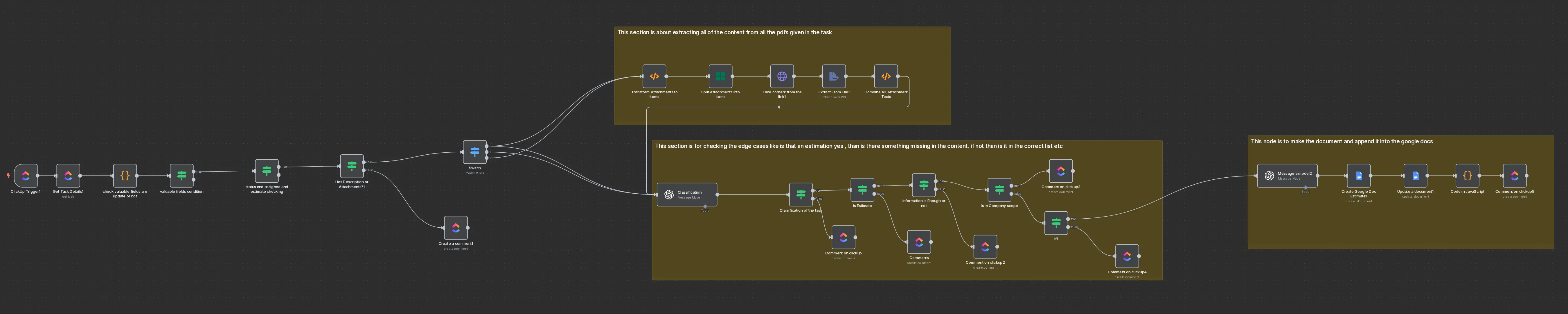
A salesperson creates or edits a task in ClickUp, and the trigger fires. A code step compares the status, assignee and estimate fields to decide whether anything meaningful changed; if not, the run stops there. A task with no description and no attachments gets a comment straight back, mentioning its creator and asking for one or the other. Otherwise the attached PDFs are downloaded, their text is extracted and combined with the description, and GPT-4o classifies the whole request: whether it is clear what the task is, whether it is an estimate or a test task, whether the information is enough and if not what is missing, which category the work falls under, whether one of the company's departments covers it, and whether the task sits in the right list. Any failure becomes a specific comment to the creator, and their next update triggers the same checks again. When everything passes, a second model drafts the estimate in phases and tasks with hours, the workflow writes it to a Google Doc, and a comment with the link asks the matching department's team lead to approve it, naming the main category first when the work spans several.
A decision
The AI drafts, a team lead approves
The workflow never sends an estimate to anyone. It drafts one into a Google Doc and asks a named team lead, from the department the work falls under, to approve it, so a person stands behind every estimate. The same thinking runs through the failure paths: a request that cannot be estimated is never dropped silently. It gets a comment that says exactly what is wrong, whether that is missing information, a test task, a category no department covers, or the wrong list, so the salesperson knows what to fix, and the fix itself runs the checks again.
The real build
The workflow itself
The diagram above is drawn from this n8n workflow. Credentials are replaced with placeholders; nothing else is changed.
Opens full size in a new tab.
My part
What I built
All of it. I designed and built the whole workflow alone: the trigger and change detection, the attachment extraction, the classification prompts, every comment path, and the estimate generation into Google Docs.
More work
Other systems I've built
- Written by
- Usman Ali, Founder
- Last reviewed

Next step
Ready to scale operations without more busywork?
Bring the workflow, lead leak, reporting gap or knowledge bottleneck. You talk to the engineer who would build it, and leave knowing what it would take to ship.
Free, no obligation.